Pixel IPTV

Tudo o que precisas,
numa só app.
Everything you need,
in one app.

Grátis para ver, sem limite de tempo. Traz a tua própria lista.Free to watch, with no time limit. Bring your own playlist.1

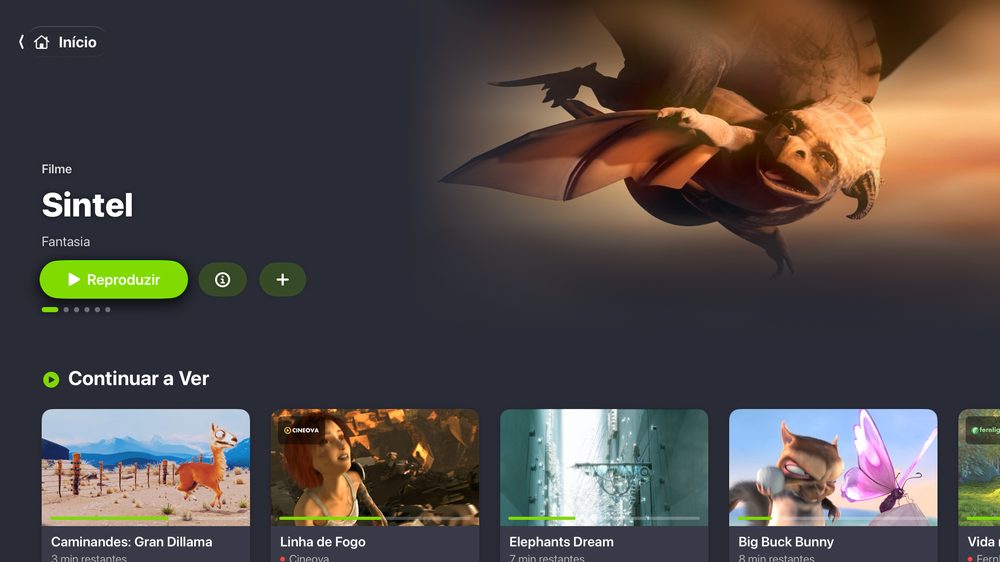
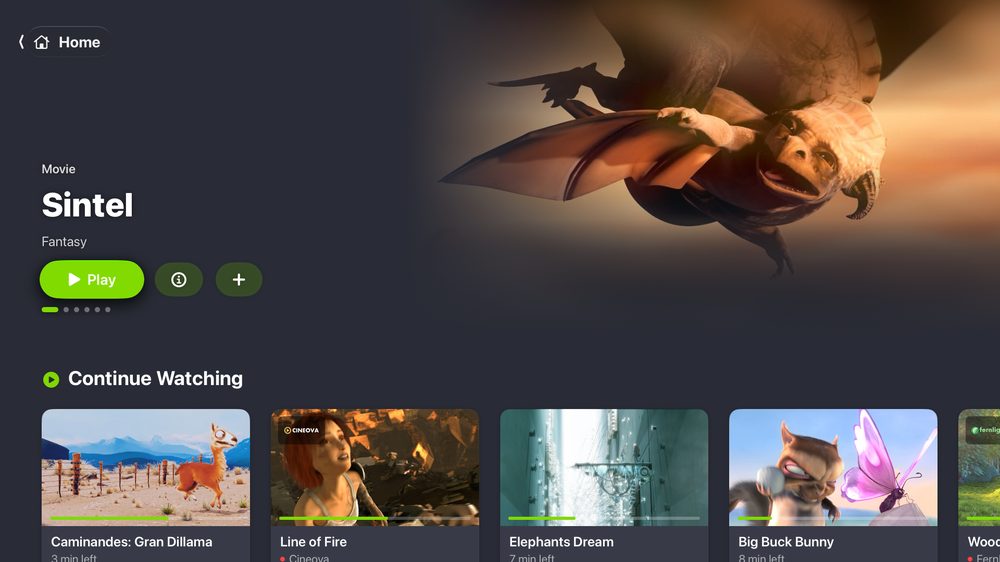
Pixel IPTV na Apple TV: Início, com o filme Sintel em destaque no topo e a fila Continuar a Ver com o progresso de cada título (canais e títulos fictícios de demonstração; imagens de filmes da Blender Foundation)Pixel IPTV on Apple TV: Home, with the film Sintel featured at the top and the Continue Watching row showing each title’s progress (fictional demo channels and titles; images from Blender Foundation films)
Pixel IPTV no iPad: o canal a tocar ao lado da lista de canais (canais fictícios de demonstração)Pixel IPTV on iPad: the channel playing beside the channel list (fictional demo channels)
Pixel IPTV no iPhone: ecrã Início com Continuar a Ver e Os Meus Canais (canais fictícios de demonstração)Pixel IPTV on iPhone: Home with Continue Watching and My Channels (fictional demo channels)

No iPad e no iPhoneOn iPad and iPhone

Um ecrã. A noite toda.One screen. All evening long.

Pixel IPTV no iPad: o canal a tocar ao lado da lista de canais (canais fictícios de demonstração)Pixel IPTV on iPad: the channel playing beside the channel list (fictional demo channels)
Pixel IPTV no iPad: Guia TV em grelha com vários canais (canais fictícios de demonstração)Pixel IPTV on iPad: TV Guide grid with several channels (fictional demo channels)
Pixel IPTV no iPad: Multiview com nove canais (canais fictícios de demonstração)Pixel IPTV on iPad: Multiview with nine channels (fictional demo channels)
Pixel IPTV no iPad: Favoritos com o leitor ao lado e Hoje nos teus canais (canais fictícios de demonstração)Pixel IPTV on iPad: Favourites with the player beside them and Today on your channels (fictional demo channels)
  1. Pixel IPTV no iPad: o canal a tocar ao lado da lista de canais (canais fictícios de demonstração)Pixel IPTV on iPad: the channel playing beside the channel list (fictional demo channels)

    Muda de canal sem largar a imagem.Change channel without losing the picture.

    O canal continua a tocar ao lado da lista, que mostra o que está a dar em cada um e quanto falta.The channel keeps playing beside the list, which shows what’s on each one and how long is left.

  2. Pixel IPTV no iPad: Guia TV em grelha com vários canais (canais fictícios de demonstração)Pixel IPTV on iPad: TV Guide grid with several channels (fictional demo channels)

    A noite inteira, num relance.The whole evening at a glance. Pro

    A grelha de todos os canais e o guia de cada um, a partir do guia XMLTV da tua lista ou de um guia público.A grid of every channel and each channel’s own guide, from your playlist’s XMLTV guide or a public one.

  3. Pixel IPTV no iPad: Multiview com nove canais (canais fictícios de demonstração)Pixel IPTV on iPad: Multiview with nine channels (fictional demo channels)

    Nove canais. Um só som.Nine channels. One sound. Pro

    Até 4 canais no iPhone e 9 no iPad. Um toque escolhe o som.Up to 4 channels on iPhone and 9 on iPad. One tap picks the sound.

  4. Pixel IPTV no iPad: Favoritos com o leitor ao lado e Hoje nos teus canais (canais fictícios de demonstração)Pixel IPTV on iPad: Favourites with the player beside them and Today on your channels (fictional demo channels)

    Os teus canais primeiro.Your channels first.

    Os favoritos à mão, «Hoje nos teus canais» com o que está a dar neles, e um Início arrumado à tua maneira. Personalizar o Início, as categorias e os logótipos é grátis.Favourites at hand, “Today on your channels” with what’s on them, and a Home arranged your way. Customising Home, categories and logos is free.

Os guias públicos escolhem-se em Definições › EPG.Public guides are picked in Settings › EPG.

O leitorThe player

Nunca largas a imagem.Never leave the picture.

  • Leitor no iPhone com a fila de canais por baixo do vídeo (canais fictícios de demonstração)iPhone player with the channel row under the video (fictional demo channels)

    Canais por baixo da imagem.Channels under the picture.

    Faz zapping sem fechar o vídeo. A fila mostra o que está a dar em cada canal.Zap without closing the video. The row shows what’s on each channel.

  • Leitor no iPhone na horizontal com a fila Guia aberta por cima da imagem: o programa no ar destacado a verde (canal e programas fictícios de demonstração; imagem do filme Sintel, da Blender Foundation)iPhone player in landscape with the Guide row open over the picture: the programme on air highlighted in green (fictional demo channel and programmes; frame from the film Sintel, by the Blender Foundation)

    O que está a dar, sem sair.What’s on, without leaving.

    A fila Guia mostra o programa no ar. É grátis.The Guide row shows the programme on air. It’s free.

  • Leitor no iPhone com os comandos à vista (canais fictícios de demonstração)iPhone player with the controls showing (fictional demo channels)

    Os comandos todos à mão.Every control at hand.

    Picture in Picture e mini leitor Pro, AirPlay e Chromecast Pro, temporizador para dormir Pro.Picture in Picture and mini player Pro, AirPlay and Chromecast Pro, sleep timer Pro.

Dois motores, escolhidos sozinhos. O AVPlayer ou o VLC, conforme o canal toca melhor.Two engines, picked for you. AVPlayer or VLC, whichever plays the channel best.

Recua no direto. Mantém o dedo na imagem para ver o que já deu; «Direto» traz-te de volta.Rewind live TV. Hold your finger on the picture to see what’s been on; “Live” brings you back.

Continua onde ficaste.Pick up where you left off.

Continuar a VerContinue Watching

Fila Continuar a Ver com seis títulos e o progresso de cada um (títulos fictícios e filmes da Blender Foundation)Continue Watching row with six titles and each one’s progress (fictional titles and Blender Foundation films)

Filmes e séries no Videoclube. Separadores próprios, filtros Vistos e Por ver, e retomas onde paraste. Capas e sinopses Pro.Films and series in the Video Club. Their own tabs, Watched and Unwatched filters, and resume where you stopped. Artwork and synopses Pro.

Continuar a Ver em todo o lado. No Início, no widget e na Apple TV, pelo iCloud. ProContinue Watching everywhere. On Home, in the widget and on Apple TV, via iCloud. Pro

Tudo na Biblioteca. As transferências, as gravações do Pixel Server e os programas que segues, num só sítio. ProAll in the Library. Downloads, Pixel Server recordings and the shows you follow, in one place. Pro

Pixel IPTV no iPhone: Videoclube › Filmes em grelha (títulos fictícios e filmes da Blender Foundation)Pixel IPTV on iPhone: Video Club › Films grid (fictional titles and Blender Foundation films)

Apple TV

A sala, como deve ser.The living room, done right.

Ver na Apple TV é grátis. O Pro traz as mesmas funções que no iPhone e no iPad: o Guia TV, o Multiview, o Continuar a Ver e as gravações no Pixel Server.Watching on Apple TV is free. Pro brings the same features as on iPhone and iPad: the TV Guide, Multiview, Continue Watching and Pixel Server recordings.

Pixel IPTV na Apple TV: Guia TV em grelha, com o programa escolhido em destaque por cima e a linha da hora atual (canais e programas fictícios de demonstração; imagem do filme Sintel, da Blender Foundation)Pixel IPTV on Apple TV: TV Guide grid, with the selected programme shown above it and the current-time line (fictional demo channels and programmes; frame from the film Sintel, by the Blender Foundation)

Som de cinema pelo receptor. O Dolby Digital e o Dolby Digital Plus, com Atmos, seguem tal como vêm.Cinema sound through your receiver. Dolby Digital and Dolby Digital Plus, Atmos included, go through untouched.2

A TV acompanha o vídeo. A Apple TV pede ao televisor a frequência de imagem e o HDR do que estás a ver, e volta ao normal quando fechas.Your TV follows the video. Apple TV asks your television for the frame rate and HDR of what you’re watching, and switches back when you close it.3

Logo no topo. Põe a Pixel IPTV na fila de cima e o Top Shelf mostra-a mal ligas a Apple TV.Right at the top. Put Pixel IPTV in the top row and Top Shelf shows it as soon as you turn on Apple TV.

Grava a partir do sofá. «Gravar no Pixel Server» no guia, na pesquisa e no leitor. ProRecord from the sofa. “Record to Pixel Server” from the guide, search and the player. Pro

tvOS 17 ou mais recente.tvOS 17 or later.

Em casa, em todos os ecrãs.Every screen in the house.

  • iPhoneiOS 17.6 ou mais recenteiOS 17.6 or later
  • iPadiPadOS 17.6 ou mais recente. Barra lateral, Split View e Stage Manager.iPadOS 17.6 or later. Sidebar, Split View and Stage Manager.
  • Apple TVtvOS 17 ou mais recente. Ver é grátis.tvOS 17 or later. Watching is free.

A app existe para iPhone, iPad e Apple TV. Uma compra Pro serve nos três, com a mesma conta Apple.The app is for iPhone, iPad and Apple TV. One Pro purchase covers all three, with the same Apple Account.

Descarregar na App StoreDownload on the App StoreDescarregar na App StoreDownload on the App Store

Pixel Server · Novo · grátisPixel Server · New · free

Grava em casa com o Pixel Server.Record at home with Pixel Server.

Uma app à parte e grátis que grava os programas que escolhes, mesmo com o iPhone desligado. Gravar a partir da app é Pro.A separate, free app that records the shows you pick, even with your iPhone off. Recording from the app is Pro.4

E ainda.And there’s more.

  • M3U e Xtream. Cola o endereço da lista ou entra com a conta Xtream. O guia XMLTV vem com a lista.M3U and Xtream. Paste the playlist address or sign in with your Xtream account. The XMLTV guide comes with the list.
  • Um canal, todas as qualidades. SD, HD, FHD e 4K do mesmo canal juntam-se num só.One channel, every quality. SD, HD, FHD and 4K of the same channel become one.
  • Pesquisa global. Com uma grelha de categorias para explorar. ProGlobal search. With a category grid to browse. Pro
  • Seguir, lembrar, recuperar. Programas seguidos, lembretes e catch-up. ProFollow, remind, catch up. Followed shows, reminders and catch-up. Pro
  • Listas juntas. Junta várias listas; se um canal falhar numa, toca a da outra. ProMerged playlists. Combine several playlists; if a channel fails in one, the other plays. Pro
  • Temporizador e Trakt. Adormece descansado e regista o que vês. ProSleep timer and Trakt. Fall asleep in peace and log what you watch. Pro
  • Modo Crianças com PIN. Só os canais e os filmes que escolhes.Kids Mode with a PIN. Only the channels and films you choose.
  • Quando falha, diz porquê. E tenta outra vez sozinha antes de desistir.When it fails, it tells you why. And it retries on its own before giving up.
  • Privada por natureza. Sem contas, anúncios nem estatísticas.Private by design. No accounts, ads or analytics.5

Grátis para ver.
Pro para tudo o resto.
Free to watch.
Pro for everything else.

A versão gratuita não tem limite de tempo. O Pro é uma só compra para o iPhone, o iPad e a Apple TV.The free version has no time limit. Pro is one purchase for iPhone, iPad and Apple TV.

  • 1,99 €/mês€1.99/month
  • 12,99 €/ano€12.99/year
  • 49,99 € vitalício€49.99 lifetime6
Comparação entre Grátis e ProFree and Pro compared
FuncionalidadeFeatureGrátis · 0 €Free · €0Pro
Direto, filmes e séries sem limite de tempoLive TV, films and series with no time limit
Ver na Apple TVWatch on Apple TV
Fila Guia no leitorGuide row in the player
Personalizar Início, categorias, logótipos e guiaCustomise Home, categories, logos and guide
ListasPlaylists1Sem limiteUnlimited
FavoritosFavourites2 canais + 2 filmes ou séries2 channels + 2 films or series2 canais + 2 filmes ou séries2 channels + 2 films or seriesSem limiteUnlimited
Só no ProPro only
Guia TV em grelha e guia do canalTV Guide grid and channel guide
Pesquisa globalGlobal search
Seguir programas e lembretesFollow shows and reminders
Catch-up
Picture in Picture e mini leitorPicture in Picture and mini player
Multiview
AirPlay e ChromecastAirPlay and Chromecast
TransferênciasDownloads
Capas e sinopsesArtwork and synopses
Continuar a Ver e widgetsContinue Watching and widgets
Juntar listasMerge playlists
Gravar no Pixel ServerRecord to Pixel Server
TemporizadorSleep timer
Trakt

As mesmas funções Pro na Apple TV.The same Pro features on Apple TV.

PerguntasQuestions

A Pixel IPTV inclui canais?Does Pixel IPTV include channels?

Não. É um leitor: vês a lista M3U ou a conta Xtream que já tens.No. It’s a player: you watch the M3U playlist or Xtream account you already have.1

A versão gratuita tem limite de tempo?Does the free version have a time limit?

Não. Vês direto, filmes e séries sem limite, com uma lista e dois favoritos de cada tipo. Ver na Apple TV também é grátis. O Pro junta o resto: o Guia TV em grelha, o Multiview, as gravações e mais.No. You watch live TV, films and series with no limit, with one playlist and two favourites of each kind. Watching on Apple TV is free too. Pro adds the rest: the TV Guide grid, Multiview, recordings and more.

Uma compra serve para todos os aparelhos?Does one purchase cover all my devices?

Sim. O Pro serve no iPhone, no iPad e na Apple TV com a mesma conta Apple.Yes. Pro works on iPhone, iPad and Apple TV with the same Apple Account.

Os meus dados vão para algum servidor?Does my data go to a server?

Não temos servidores, estatísticas nem anúncios. Os favoritos e o progresso sincronizam pelo teu iCloud. O endereço da lista e os dados de acesso vão cifrados para o teu iCloud privado, só para a tua Apple TV os poder ler.We have no servers, analytics or ads. Favourites and progress sync through your iCloud. The playlist address and sign-in details go encrypted to your private iCloud, only so your Apple TV can read them.5

O que é o Pixel Server?What is Pixel Server?

Uma app à parte e grátis que grava em casa, num Mac, Linux, Windows ou Docker (NAS). Gravar a partir da app é Pro.A separate, free app that records at home, on a Mac, Linux, Windows or Docker (NAS). Recording from the app is Pro.

Experimenta hoje. É grátis.Try it today. It’s free.

  1. 01

    Instala a appInstall the app

    Grátis, no iPhone, iPad e Apple TV.Free, on iPhone, iPad and Apple TV.

  2. 02

    Junta a tua listaAdd your playlist

    Cola o endereço M3U ou entra com a conta Xtream.Paste the M3U address or sign in with your Xtream account.

  3. 03

    Carrega no playPress play

    Os canais ficam arrumados em segundos.Your channels are sorted in seconds.

Pixel IPTV

Grátis para ver. Pro a partir de 1,99 €/mês.Free to watch. Pro from €1.99/month.6
  1. Traz a tua própria lista. A Pixel IPTV é um leitor de multimédia: não fornece, não vende e não aloja canais, listas nem conteúdos, e não tem ligação a nenhum fornecedor de IPTV. És responsável pelos direitos do que adicionas.Bring your own playlist. Pixel IPTV is a media player: it does not provide, sell or host channels, playlists or content, and it is not affiliated with any IPTV provider. You are responsible for the rights to what you add.↩
  2. Precisa de um receptor ou barra de som compatível e de um canal ou filme com esse som. O DTS e o TrueHD continuam a ser descodificados pela app.Needs a compatible receiver or soundbar and a channel or film that carries that audio. DTS and TrueHD are still decoded by the app.↩
  3. Precisa de que a Apple TV esteja configurada para ajustar a frequência e a gama dinâmica ao conteúdo, nas definições de vídeo.Needs Apple TV to be set to match frame rate and dynamic range to the content, in its video settings.↩
  4. O Pixel Server é grátis. O computador tem de estar ligado para gravar. Agendar gravações a partir da app precisa do Pro.Pixel Server is free. The computer must be on to record. Scheduling recordings from the app needs Pro.↩
  5. O endereço da lista e os dados de acesso vão cifrados para o teu iCloud privado, só para a tua Apple TV os poder ler. Nós não temos acesso ao teu iCloud.The playlist address and sign-in details go encrypted to your private iCloud, only so your Apple TV can read them. We have no access to your iCloud.↩
  6. Preços na App Store de Portugal, com IVA. Noutros países, a App Store mostra o preço local. As subscrições renovam-se automaticamente e cancelas quando quiseres nas definições da tua conta Apple.Prices on the Portuguese App Store, VAT included. Elsewhere the App Store shows the local price. Subscriptions renew automatically and you can cancel any time in your Apple Account settings.↩